Library of Routines
for PIC12F629
Nearly all these instructions also work
with
PIC16F628. Just check on Port value(s) and
first available file.
A-E
E-P P-Z

Pause
To create a "pause" instruction:
Loop
goto $
This will cause the microcontroller to keep looping the same instruction.
or
Loop nop
goto Loop
PULSE WIDTH
MODULATION (PWM)
To make a motor-driven toy (car, robot
etc) travel
at a slow speed (or any speed) the RPM (revolutions per minute) of
the motor needs to controlled. You can do this by supplying less cells (less
"batteries") a lower voltage via a power supply or providing pulses of
energy that cause the RPM of the motor to increase or decrease. You can also
add a resistance to one of the leads.
One of the simplest ways is to provide pulses of energy and this can be done
with transistors, IC's or a microcontroller.
The following code allows 2 motors to be controlled via 16 steps, from 0 to
16. The code simply delivers a value such as 4/16 to one motor and 12/16 to
the second motor in 1/100th second.
The value of the step is contained in file M1 (for motor-1) and M2 (for
motor-2).
			;M1 & M2 are the bits in Ghost file for the motors
			;PWM1 is the file for motor 1 speed (0-15)
			;PWM2 is the file for motor 2 speed (0-15)
			;Ghost file holds the bits (M1 & M2) to turn on/off each motor
Preload the PWM files:

		movlw	(0 to .15 - decimal 15)
		movwf	PWM1
		movlw	(0 to .15 - decimal 15)
		movwf	PWM2


DoPWM		bsf	Ghost,M1		;turn motor 1 on
		bsf	Ghost,M2		;and motor 2
		movlw	1		;preload W
PwmLoop		subwf	PWM1,f		;sub 1 from PWM1
		btfss	STATUS,dc	;was there a borrow from bit 4
		bcf	Ghost,M1		;yes so turn motor 1 off
		subwf	PWM2,f		;now do second channel
		btfss	STATUS,dc
		bcf	Ghost,M2		;turn motor 2 off
		movf	Ghost,w		;copy register to w
		movwf	GPIO		;move w to I/O register
		movlw	1		;reload W
		addwf	Count,f		;inc count but set flags
		btfss	STATUS,dc	;have we been around 16 times
		goto	PwmLoop		;no, so go around inner loop
		btfss	STATUS,z		;have we done 256 times
		goto	DoPWM		;no so repeat outer loop
		retlw	0		;done
Push and Pop
and "Save"
Push and Pop are terms used when programming some
of the "older style" microprocessors and refers to the ability to store a
value (in a file) and send it to a place called a "stack" and get it back
later. The microcontrollers we are dealing with have lots of files and we
rarely run out of them so the ability to save a value is not available.
However when you write an instruction such as CALL Del-1, the current
address of your program is placed on the stack so the micro can come back to
the next instruction, after it has executed the instructions at the
sub-routine called Del-1.
If you want to save a value in a register,
you will need to load it into "w" and from w to one of the unused
files, thus:
movf the file with the value,0 to w
such as 3A,0
movwf the file that will save the value
such as 4B e.g: movf 3A,0
; (the value in file 3A gets copied into the working register)
movwf 4B
; (the value in the working register gets copied to file 4B)
Poll
See
also Switch
The action of POLLING means to "look
at - on a regular basis." It generally refers to an
input device such as switch or push button. A push button can be pressed
and released in less than 10th second and this means it must be scanned
or polled 10 times a second (100mS).
This means you have 100,000 machine cycles available between "looks."
Most programs consist of a Main routine and this is looped
on a regular basis. As a program gets larger and larger, the Main
routine may loop at a slower rate (mainly due to delay sub-routines
needed for some of the operations) and you may exceed the 100,000
limit.
The answer is to place the "look" feature inside the delay
sub-routine. The following sub-routine has a "Look"
feature inside a Delay:
Delay
Delay1
Not
Delay2
Main
|
MOVLW 01h
MOVWF 2C
NOP
DECFSZ 2A,1
GOTO Delay1
BTFSS 05,0
GOTO Not
BSF 2F,0
RETLW 00
BCF 2F,0
BCF 2F,1
DECFSZ 2B,1
GOTO Delay1
DECFSZ 2C,1
GOTO Delay1
RETLW 00
CALL Delay
other instructions
BTFSS 2F,0
GOTO Main
BTFSC 2F,1
GOTO Main
BSF 2F,1
CALL Action
GOTO Main |
;Approx
300mS per "unit"
;Look at push-button line on port A
;Button not pressed
;Set button-press flag
;Clear button-press flag
;Clear "action"
flag
;Has button been pushed?
;No.
;Yes. Has "action" already been performed?
;Yes.
;No.
|
|
The Delay sub-routine includes instructions
to look at a button and set a flag (BSF
2F,0) when it is pressed.
The micro comes out of the Delay routine with the flag SET. The
flag is then looked at in Main and the appropriate sub-routine is
executed.
This sequence may be executed very quickly and the micro may return
to Delay before the button is released. The "action" flag
(BTFSC 2F,1) prevents the action being
carried out more than once for a single button-press.
When the button is released, both flags are cleared.

Pseudo Instructions
- these are additional
Instructions understood by MPASM:
|
Mnemonic
|
Description
|
Equivalent
Operation(s)
|
Status
|
|
ADDCF
|
f,d
|
Add Carry to File
|
BTFSC
INCF
|
3,0
f,d
|
Z
|
|
ADDDCF
|
f,d
|
Add Digit Carry to File
|
BTFSC
INCF
|
3,1
f,d
|
Z
|
|
B
|
k
|
Branch
|
GOTO
|
k
|
-
|
|
BC
|
k
|
Branch on Carry
|
BTFSC
GOTO
|
3,0
k
|
-
|
|
BDC
|
k
|
Branch on Digit Carry
|
BTFSC
GOTO
|
3,1
k
|
-
|
|
BNC
|
k
|
Branch on No Carry
|
BTFSS
GOTO
|
3,0
k
|
-
|
|
BNDC
|
k
|
Branch on No Digit Carry
|
BTFSS
GOTO
|
3,1
k
|
-
|
|
BNZ
|
k
|
Branch on No Zero
|
BTFSS
GOTO
|
3,2
k
|
-
|
|
BZ
|
k
|
Branch on Zero
|
BTFSC
GOTO
|
3,2
k
|
-
|
|
CLRC
|
|
Clear Carry
|
BCF
|
3,0
|
-
|
|
CLRDC
|
|
Clear Digit Carry
|
BCF
|
3,1
|
-
|
|
CLRZ
|
|
Clear Zero
|
BCF
|
3,2
|
-
|
|
LCALL
|
k
|
Long Call
|
BCF/BSF
BCF/BSF
CALL
|
0x0A,3
0x0A,4
k
|
|
|
LGOTO
|
k
|
Long GOTO
|
BCF/BSF
BCF/BSF
GOTO
|
0x0A,3
0x0A,4
k
|
|
|
MOVFW
|
f
|
Move File to W
|
MOVF
|
f,0
|
Z
|
|
NEGF
|
f,d
|
Negate File
|
COMF
INCF
|
f,1
f,d
|
Z
|
|
SETC
|
|
Set Carry
|
BSF
|
3,0
|
-
|
|
SETDC
|
|
Set Digit Carry
|
BSF
|
3,1
|
-
|
|
SETZ
|
|
Set Zero
|
BSF
|
3,2
|
-
|
|
SKPC
|
|
Skip on Carry
|
BTFSS
|
3,0
|
-
|
|
SKPDC
|
|
Skip on Digit Carry
|
BTFSS
|
3,1
|
-
|
|
SKPNC
|
|
Skip on No Carry
|
BTFSC
|
3,0
|
-
|
|
SKPNDC
|
|
Skip on No Digit Carry
|
BTFSC
|
3,1
|
-
|
|
SKPNZ
|
|
Skip on Non Zero
|
BTFSC
|
3,2
|
-
|
|
SKPZ
|
|
Skip on Zero
|
BTFSS
|
3,2
|
-
|
|
SUBCF
|
f,d
|
Subtract Carry from File
|
BTFSC
DECF
|
3,0
f,d
|
Z
|
|
SUBDCF
|
f,d
|
Subtract Digit Carry from File
|
BTFSC
DECF
|
3,1
f,d
|
Z
|
|
TSTF
|
f
|
Test File
|
MOVF
|
f,1
|
Z
|
Pull-ups
The PIC12F629 has individual pull-ups of about 47k on each line,
that can be activated via the following code. When a line is made
into a input, the pull-up is not active, but is re-activated when
the line is changed to output.
Pin 4, GPIO,3 (GP3) is an INPUT-ONLY pin and does not
have a pull-up.
In the following instructions, GPIO,5 will have a weak pull-up. A
push-switch is connected between GPIO,5 and ground. When the switch
is pressed, the input will go LOW. This is called an active
LOW input. GPPU is an active LOW enable bit. It is written:
GPPU. In the program
it is identified as NOT_GPPU as the "Word" document does not overlines.
When this bit is cleared (bcf), pull-ups are enabled by individual
pot latch values. movlw b'11101000' ;Specify GPIO port direction
movwf TRISIO ;Set GPIO ports as xxIOIOOO
bcf OPTION_REG
bcf NOT_GPPU ;enable weak pull-up
bsf WPU, 5 ;enable wpu on GPIO 5 only
Random
number see also
Mask
A random number can be created by
monitoring the TIMER file and looking at this file when a player has
pushed a button.
|
Get_Random |
movf tmr0,0
andlw 0x03
movwf 27h
retlw 00 |
;Read the PIC's timer register and put it in W
;mask all but bit0 and bit1 to get values 0,1,2,3.
;move random number to file 27h (the RANDOM
; number
file). | | To get a random number: 0-7, mask all
but bits 0,1,2: andlw 0x07
The random number file can be incremented if zero is not
needed (this will be the second instruction in the sub-routine
above) and then "andlw" is carried out.
Here is another Random Number Generator form
Andrew Warren [fastfwd
at ix.netcom.com] of Fast Forward Engineering - San Diego, California.
Load a register called "RANDOM" with any non-zero value, then call this
routine each time you'd like a new pseudo-random value: LFSR =
Linear Feedback Shift Register. LFSR: RLF RANDOM,W
RLF RANDOM,W
BTFSC RANDOM,4
XORLW 1
BTFSC RANDOM,5
XORLW 1
BTFSC RANDOM,3
XORLW 1
MOVWF RANDOM
RETLW 0
Scott Dattalo says:
[with the double RLF at the start of this routine,] Andy is implementing
'roll left' where the most significant bit of RANDOM will get copied to
least significant position. This is how it works. The first RLF will
copy the most significant bit of RANDOM into the carry. What ever was in
the carry prior to the first RLF will get copied into the least
significant bit position - but we don't care. Also, since the
destination is the W register, the variable RANDOM is unaffected. The
second RLF repeats the same rotate operation, but this time the carry
has been initialized to the MS bit of random. So this second rotate will
copy the MS bit into the least significant bit. All of the other bits
are of course shifted left one bit position.
Read
a File
Files can be used to store temporary data.
A file can be read by moving (it actually gets copied and the
original is not altered) it into the W register via an
instruction such as: movf 3Ch,0
A file can be "read" and an action performed if it is zero. Use
instructions such as:
decfsz 3Ch,0
goto button-1
;the file is not zero
goto button-2
;the file is zero
Any bit in a file can be read and an action carried out. In this
case bit 3 is tested:
btfss 3Ch,3
goto button-1 ;bit 3 is
"0"
goto button-2
;bit 3 is "1"
Read
Data
The PIC12F629 does not have a feature such as "Read Data"
or "Read an Instruction." Data can be added to a program
(when writing the program) in the form of a table (see Table) and this data cannot be altered. Each
item in the table can be read by writing an instruction such as:
retlw 4Fh
retlw 22h
retlw 0CCh
Temporary data can be stored in a file or set of files. There are
68 files (from 20h to 5F).
Data can also be added to the EEPROM section. This is 128 bytes of
data and can be changed up to 1 million times. The data will be kept
when the power is removed.
Remove
bits see AND
and Mask
Return
- not used for PIC12F629, use:
Ret lw
00
This instruction must be somewhere in each sub-routine if the
sub-routine has been CALLED. It is generally
at the end, but quite often programming will create a Return
part-way through a routine. The instruction to use for a
PIC12F629 is: retlw 00 to
retlw 0FFh
See CALL and GOTO for more details.
RETLW 00 to FF - Return
with Literal in W
A sub-routine
can carry out an operation and set a flag. Alternatively it can
return with a value in W.
If a sub-routine generates two or three different results, the RETLW
00 to FF instruction can Return with the appropriate value in W.
RETLW 00 to FF is used for each value of data in a Table.
(see Table)
Rotate
This is the same as SHIFT. All the
bits in a file are moved to the left or right through the CARRY.
Carry is located in the STATUS file (03,0).
It requires 9 shifts (rotates) to get the bits back to the original
position.
The CARRY must be cleared (BCF 03,0) if you don't want it to appear
in the file.
RLF (Rotate Left File)
increases the value of the contents (doubles the value).
RRF (Rotate Right File) decreases the value
of the contents (halves the value).
The following two instructions will
rotate the contents of a file register without loosing data in the "Carry
Flag".
Rotate right or left can be implemented. Note
that the carry flag is changed.
Enter with "abcdefgh" and leave with
"bcdefgha"
  rlf   Register, w        ;Load Carry with the highest bit
  rlf   Register, f        ;Shift left

or
Enter with "abcdefgh" and leave with
			"habcdefg"


  rrf   Register, w        ;Load Carry with the lowest bit
  rrf   Register, f        ;Shift right
Same
To find out if two numbers are the same,
they are XORed together. See XOR and Comparison
SetUp
The first sub-routine in a program is SetUp. It sets the direction
for each Input/Output line and clears any other files to get them
ready for incrementing etc.
To make a line INPUT or OUTPUT, see INPUT, OUTPUT.
Instructions between
BSF 03,5 and BCF 03,5 are dealing with
files files in Bank 1. For instance, if files 05 is loaded with 02,
this is actually the TRISIO file. This file controls the direction of the Input/Output lines
of GPIO and when it contains 0's, all the lines are output. Note:
GP3 is input only
SetUp
|
ORG
0
BSF 03,5
MOVLW 02
MOVWF TRISIO
BCF 03,5
CLRF 2F
CLRF GPIO
GOTO Main |
;This
is the start of memory for the program.
;Go to Bank 1
;Load W with 0000 0010
;Make GP1 input
;Go to Bank 0 - the program memory area.
;Clear flag file
;Clear GPIO of junk
|
|
For PIC16F628A, the port setting must be done separately:
SetUp
|
ORG
0
BSF 03,5
movlw 02
movwf trisA
BCF 03,5
nop
BSF 03,5
movlw b'00000000'
movwf trisB
BCF 03,5
CLRF 2F
CLRF GPIO
GOTO Main |
;This
is the start of memory for the program.
;Go to Bank 1
;Load W with 0000 0010
;
;Go to Bank 0 - the program memory area.
;Clear flag file
;Clear GPIO of junk
|
|
Set and Clear
These are two terms that are used in two of the institutions.
btfss gpio,0 This instruction means: “test the pin and skip if the reading
is high.
btfsc. gpio,0 This instruction means: “test the pin and skip if the reading
is zero.”
Here is a sample instruction:
btfss gpio,0 gpio refers to one of the files that is connected
directly to pins 2,3,4,5,6,7 and these pins are the input/output pins for
the microcontroller.
Here’s how the instruction works
btfss gpio,0
goto $+3
goto $+5
The instruction looks at pin 7 of an 8-pin PIC microcontroller.
This pin has been turned into an input pin via instructions at the beginning
of the program.
It has to be an input to detect signals on the pin.
If the voltage on the pin is above 2.5v it is considered to be HIGH.
This means the pin is seeing a SET = “s”
The instruction says: if pin 7 sees a HIGH, the micro will go to the third
instruction,
which is: goto $+5, and land on an instruction that is five instructions
down the program and execute the instruction at that location.
If the voltage on pin7 is below 2v, the micro sees a LOW = “c” and the
program goes to the second instruction: goto $+3 which is 3 instructions
down the program and executes the instruction at that location.
The instructions above provide two “branches” or “goto’s”
The following instructions provide just one branch.
btfss gpio,0
goto $+8
movlw .23
The micro will look at pin 7 and if it is LOW, it will go to the
instruction 8 instructions below. That is because the instructions asks for
a HIGH to go to movlw .23
How to use the “clear” and
“set” instruction.
The instruction btfss gpio,0 will detect if a pin is seeing a signal (or
voltage).
This action is called “Polling.”
The signal needs to be present on the pin and the program and the micro
comes to it in the normal way and when it comes to the instruction, the
program will perform the operation.
The signal just “sits there” waiting for the program to come to the
instruction.
If the signal only appears for a very short time, you need to look at the
instruction on a regular basis. This is called “looping” or “polling.”
You can get the program to come to the pin when it changes state by setting
the state of the pin in the program during programming. But we have not
covered this as it is quite complex.
The letter “c” means “clear” and refers to the value “0” or LOW
The letter “s” means “set” and refers to the value “1” or HIGH
At the beginning of a program, the pins are set-up as input or output via
the following four instructions:
bsf
status,rp0 ;Bank 1
movlw b'00000110' ;Set TRIS
movwf TRISIO
bcf status, rp0 ;bank 0
When a pin is created as an INPUT, the value “1” is placed in the location
corresponding to the pin in the instruction: movlw where the lowest number
represents gpio,0 and when the value is “0” the pin is an Output.
When the number is “1” the pin is an input.
In the instructions above, pin 7 is an output, pin 6 is an input, pin 5 is
an input, pins 4,3,2 are outputs.
The other two places in the file are not used.
When the number is “1” the pin is an input.
You must connecte something to the pin that will make it received a zero
signal or a HIGH signal.
The low signal needs to be from 0v to about 2v and the high signal needs to
be above 2.5v
The instruction btfss gpio,0 means to test the lowest of the six input pins,
(which is pin7) and skip the next instruction if it sees a HIGH.
btfsc gpio,0 and skip the next instruction if it sees a LOW
Don’t let an input pin ”float”. Make sure it is being “held” or “taken” HIGH
or LOW.
SUMMARY:
c = clear = LOW
s = set = HIGH
Shift
see Rotate
SLEEP
This instruction puts the micro to sleep. This is
also called "power-down mode."
The micro stops executing the program when it comes to this
instruction.
If the Watchdog Timer is enabled, it will be cleared but will keep
incrementing.
The In/Out lines maintain the status they had before SLEEP was
executed.
For the lowest consumption in SLEEP, all output lines must not drive
any circuitry before the SLEEP instruction.
On-chip pull-ups must also be turned off to reduce the current
consumption during SLEEP.
The micro will wake up from SLEEP via one of the following:
1. Taking MCLR
pin LOW
2. Watchdog Timer wake-up (if watchdog is enabled)
3. Interrupt from GP2/INT pin
4. GPIO change
5. Peripheral interrupt.
On wake-up from SLEEP, the WDT is cleared.
When the SLEEP instruction is being executed, the next instruction
(PC + 1) is pre-fetched. For the micro to wake up through an
interrupt event, the corresponding interrupt enable bit must be set
(enabled). Wake up is regardless of the state of the GIE bit. If the
GIE bit is clear (disabled) the micro continues execution at the
instruction after SLEEP. If the GIE bit is set (enabled) the micro
executes the instruction after SLEEP then branches to the interrupt
address (004h). In the case where the instruction following SLEEP is
not desirable, the user should have a NOP after the SLEEP
instruction.
The TO and
PD bits in the STATUS
register can be used to determine the cause of RESET. The
PD bit, which is set
on power-up, is cleared when SLEEP is invoked. The
TO bit is cleared if
WDT wake-up occurred.
The SLEEP instruction is:
sleep
To send the micro to the "sleep_micro" sub-routine, the following
instruction is needed:
goto sleep_micro
The simplest sub-routine for SLEEP is:
sleep_micro
sleep To set GPIO 3 for wake-up from sleep: This has
been tested in Greeting card "Decision Maker" bsf
status, rp0
;Bank 1
movf GPIO,0
movlw b'00001001'
;must clear the GPIF flag!!
movwf INTCON
bsf IOC,3
sleep
nop
bcf
status, rp0 ;bank 0
goto xxx If the Watchdog timer is enabled, the micro will come out of SLEEP
and goto main.
The watchdog will reset after
18,000uS (18m) and wake the micro.
If 18mS is too short, a prescaler can be added to increase the WDT
time by 2, 4, 8, 16, 32, 64 or 128. The maximum time is 18mS x 128
= 2.3sec
The micro contains an 8-bit prescaler register that can be assigned
to Timer0 or Watchdog. This prescaler register is not readable
or writable.
To set the prescaler to the WDT, bit 3 of the OPTION REGister must
be set. The instruction is:
bsf
STATUS, RP0 ;select bank 1
bsf OPTION_REG,3
or
movlw b'xxxx1xxx'
movwf OPTION_REG
bcf STATUS,
RP0 ;select bank 0
The three lowest bits of the Option register set the timing for the
WDT:
bsf STATUS, RP0 ;select
bank 1
movlw b'xxxxx000'
movwf OPTION_REG ;WDT timer = 18mS
or:
movlw b'xxxxx001'
movwf OPTION_REG ;WDT timer = 36mS
or:
movlw b'xxxxx010'
movwf OPTION_REG ;WDT timer = 72mS
etc etc
or:
movlw b'xxxxx111'
movwf OPTION_REG ;WDT timer = 2,304mS = 2.3
Seconds
bcf STATUS, RP0 ;select bank 0
GPIO CHANGE
If you want the micro to come out of sleep when the voltage-level
changes on any input line, the WDT must be turned off. This must be
done during burning the program into the chip. (You will not have
the advantage of the watchdog timer to reset the micro if it runs
off the end of the program.)
movlw b'xxxx1xxx'
; Enable GPIO port change interrupt (but NOT GIE)
movwf INTCON
Make at least one of the in-out pins an input:
bsf STATUS, RP0 ;select
bank 1
movlw b'xxxx1xxx' ;make GP3
input
movwf TRISIO
bcf STATUS, RP0 ;select
bank 0
Add the SLEEP instruction to the program:
goto sleep_micro
Add the SLEEP sub-routine:
sleep_micro
sleep
Alternately, a SLEEP instruction can be added to a program. In the program
below, the micro will stop executing instructions when it reaches "sleep"
and wait for a "time-out" of the WDT or a change in GPIO (depending on the
setting in INTCON.) If the GIE bit is set, the micro will execute
"instruction A" (after sleep) and go to
the interrupt address (004h).
instruction
instruction
instruction
sleep
instruction A - this instruction can be anything but a
GOTO instruction.
no further instructions
If you don't want an instruction after "sleep" use: NOP.
The Global Interrupt feature is enabled by setting
bit 7 of the INTCON register.
For this and other features of SLEEP see:
PIC12F629
Data Sheet (.pdf 4,926KB)
Another SLEEP
sub-routine:
To put the micro to sleep, a number of things must be done. This
routine allows the micro to go to SLEEP when it detects the SLEEP instruction.
The micro wakes up from sleep when it detects a change on GPIO,5 (pin 2).
Pin 2 must have a pull-up resistor for the following program to work. The
pull-up resistor can be external (about 47k) and a push switch to take the pin
low to take the micro out of SLEEP.
To turn on the weak internal 47k pull-up resistor, place the following
instructions in SetUp:
bsf STATUS,RP0
; Sel Bank 1
bcf OPTION_REG,NOT_GPPU ; enable weak pull-up
bsf WPU, 5
; enable wpu on GPIO 5 only
bsf IOC, 5
; enable Int-On-Change GPIO 5
bcf STATUS,RP0
; Sel Bank 0
Sleep
|
movf GPIO,W
bcf INTCON,GPIF
bsf STATUS,RP0
movlw 0xFF
movwf TRISIO
sleep
nop
movlw b'11101000'
movwf TRISIO
bcf STATUS,RP0
movf GPIO,W
bcf INTCON,GPIF
|
; Read GPIO clears Int-On-Change flag. Must read
; into W not back to F as it reads port not the output
; latch which may result in output data being
; inadvertently altered.
; Sel bank 1
; Setup W for TRISIO all input
; Write to TRISIO. Reduce power in sleep mode
; Go to sleep
;
; Wake from sleep and set
; TRISIO for input and output for your project
; Sel Bank 0
; Read GPIO register
; and clear GPIF flag in interrupt register | |
The following set of instructions have been tried in an Alarm project.
Some of the instructions may not be needed and you can try deleting and
testing for yourself. The most important point to remember is this: The
micro goes to ISR (address 04) after waking up from sleep and the
instructions at address 04 must be included:
org 0
goto setup
nop
nop
nop
nop
goto Enable
SetUp movlw b'00001111' ;0001 1111
movwf GPIO ;Make GP 0 HIGH and GP5 LOW for piezo & GP4 low
bsf status,rp0 ;Bank 1
movlw b'00011110'
movwf trisio ;Make GP1,2,3,4 input GP0,5 output
movlw b'10000110' ;Turn off T0CKI, prescaler for TMR0 = 1:128
movwf option_reg
bsf intcon,3 ;enable GPIO state change int
bsf intcon,7 ;enable global interrupt GIE
bsf IOC,4 ;enables interrupt on GPIO 4
bcf status,rp0 ;bank 0
movlw 07h ;Set up W to turn off Comparator ports
movwf CMCON ;must be placed in bank 0
movf GPIO,w ;clears the Int-on-change flag
bsf status,rp0 ;Bank 1
bcf intcon,gpif
bcf status,rp0 ;bank 0
nop
sleep
nop ;micro goes to ISR at address 04!!!!!!!!!
|
|
Stack
This is an area where up to 8 addresses
are placed. These address are RETURN address. When a CALL is made,
the address of the next instruction in your program is placed on the STACK.
The micro will go to the sub-routine you have CALLed. In this sub-routine
you can have another CALL.
This is the second CALL. In the second sub-routine you can have another
CALL. In fact this can be done up to 8 times.
If more than 8 address
are placed on the stack, the first address is lost.
That's why you cannot have more than 8 CALLs. When a return
is made, the CALL number is reduced.
The PIC12F629 can have a CALL instruction that CALLs another
sub-routine and the sub-routine CALLs another sub-routine and that sub-routine
CALLS another sub-routine until 8 CALLs are made.
The 8th sub-routine will have a RETLW 00 to go back the the
previous sub-routine and each sub-routine will have a RETLW 00 until
finally the micro returns to Main.
The animation below shows a CALL in a sub-routine CALLing another
sub-routine and this sub-routine CALLs another sub-routine.
The Program Counter makes the micro carry out the
instructions.
Note: Return is used in '508 instruction-set and Retlw 00 is used in
'629 instruction-set):
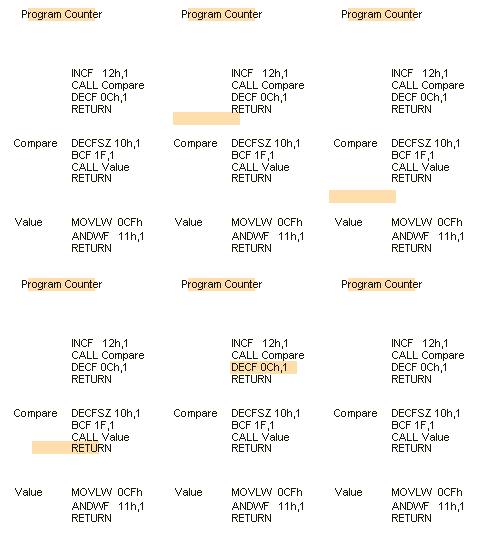
The PIC12F508 or 509 has only a "2-stack" and the low-cost PIC micro
(reserved for high-quantity orders) has only a "2-stack." It
is important to realise this so your programs are portable to other
micro's. You can have a CALL from Main and a CALL from the
sub-routine, but the second sub-routine must only have a RETLW 00.
State
Machine
The term
"State Machine" is a program that uses a file called "State" to
control program flow.
You may want to shift two files left on the first execution of a
sub-routine, shift them a further two places left on the second
execution and shift them one more place on the third execution.
The file called "state" is zeroes at the beginning and after
completing the part of the sub-routine that doube-shifts, it will be
incremented.
One the second pass, "state" is compared with "1" and the second
part of the sub-routine is executed. "State" is then incremented and
this causes the micro to execute the third part of the sub-routine.
The file "State" remembers the history of the execution of the
program and allows the correct code to be executed.
Stop
see
also Wait.
The microcontroller does not have a
Stop instruction. Do not use the word "Halt"
as a label, the assembler does not like it. Use Loop, Pause,
Wait. See Loop.
To create a "waiting loop" use the following instructions:
| Loop
|
NOP
GOTO Loop |
;Hold the micro in a loop |
|
When testing a program,
you may need to know if the microcontroller has advanced to a certain
part of the program.
Insert the instruction: GOTO Wait.
Insert the following instructions. They should include an output
to a LED etc so you can prove the micro has entered the loop.
| Wait
|
NOP
MOVLW 07h
MOVWF GPIO
GOTO Wait |
;Hold the micro in a loop
;Output a HIGH to LEDs | |
Store
Data
The PIC12F629 has two ways to store data.
If you need to store only a few bytes of data for a short period
of time, use files that are not required in any of the running of
the program.
This information will be lost when power is removed.
If you want to store data permanently, the PIC12F629 has 128 bytes
of EEPROM.
This requires a special routine - found under EEPROM.
S ound
The following program produces a "rising Sound."
sound
sound1
sound2
sound3
|
movlw 0F0h
movwf temp
bsf GPIO,0
movf temp,0
movwf soundhigh
nop
nop
nop
nop
nop
decfsz soundhigh,1
goto sound2
bcf GPIO,0
movf temp,0
movwf soundlow
nop
nop
nop
nop
nop
decfsz soundlow,1
goto sound3
decfsz temp,1
goto sound1
retlw 00 |
;
;Piezo bit HIGH
;piezo bit LOW | |
SUB
The following SUBTRACT operations are available:
sublw 00 - 0FFh -
subtract w from literal -
NOT subtract literal
from w
subwf file,w
- subtract w from file (result stored in w)
subwf file,f
- subtract w from file (result stored in file)Here is an example
of the sub(tract) operation:
movlw 0Eh -
the value 0Eh is loaded into w
movwf count - 0Eh
is moved to a file called "count." This gets a value into a file.
movf count,w
- the value in "count" is moved to w
sublw 0Fh
- subtract w (0Eh) from literal (0Fh)
0000 1111
- 0000 1110
0000 0001
Note: the last digit is INVERTED. This is a handy way to invert a digit.
SWAP
PIC language has a SWAP NIBBLES instruction. It swaps the HIGH nibble
with the LOW nibble. Swapping INDF (file 00) actually swaps
the nibbles in the file pointed to by FSR.
| |
SWAPF 2A,1 |
;Before: File 2A
= 81h After: File 2A = 18h
|
|
SWAP
THE CONTENTS OF TWO FILES
Example: File 2C = 81h
File 2D = 47h
File 2E = temp storage
| |
MOVF 2C,0
MOVWF 2E,1
MOVWF 2D,0
MOVWF 20C,1
MOVF 2E,0
MOVWF 2D,1 |
;Move 2C to W
;Move W to 20E
;Move 2D to W
;Move W to 20C
;Move 2E to W
;Move W to 2D | | To swap the contents of two files without using a temporary file:
| |
movf X, w
subwf Y, w
addwf X, f
subwf Y, f |
|
|
Another way to swap the contents of two files without using a temporary file:
| |
movf
X, w
xorwf Y, f
xorwf Y,w
movwf X
xorwf Y, f |
; Get X
; Y is now X^Y
; W is now (X^y)^X==Y (say OldY)
; Now X is OldY
; finally Y is (OldX^Y)^Y==OldX | |
SWAP
THE CONTENTS OF A FILE WITH W
Example: File 3C = 81h W = 47h
after operation: File 3C = 47h W = 81h
| |
XORWF
3C,1
XORWF
3C,0
XORWF
3C,1 |
|
|
Switch
(button, key)
see
also Poll
There is no difference between "Switch," "Button"
and "Key." They all refer to a push button that has
momentary action. It can be an individual push button, one of a number
of buttons or in a matrix of buttons such as a keypad.
With all button instructions, there are three important things to
remember. They are mechanical devices and their action is very slow
in "microprocessor-time." They produce a lot of pulses when
pushed and also when released (this is called switch-noise or switch-bounce).
In any button routine, you must also prevent a button-press being
registered more than once.
Many sub-routines already have a switch or button feature included
in them. Select an existing sub-routine or use the following.
The most important part of adding a switch or button routine is creating
the debounce feature.
This is to prevent "double-counting" when the button is
pushed or released. Try slow-pressing and slow-release to see if the
program produces a false result. If the program "double-counts,"
you will have to increase the debounce-time.
Debounce can take up a lot of computer-time. Debounce is a delay routine
that "masks" (hides - or disallows) the time when the button is pressed or released,
so that only one pulse is detected. Instead of producing a separate debounce routines, you may be able to use the time taken to execute
other sub-routines. In other words, the program looks before and
after the execution of another routine and if the button is still
pressed, the micro detects it as a "button-press."
Finally, you need to detect the first press of a button and prevent
the program operating on the button during the second pass of the
program.
The basis of detecting a button-press consists of 6 separate items
that must be placed in the following order:
There are two flags. Bit0 in file 1F is the Debounce Flag and
Bit1 in file 1F is the Button Pressed flag.
The microprocessor executes Main and CALLs Sw. If
Sw detects a key-press, two flags are SET. The first is the
Button Pressed flag and the second is the Debounce
flag.
The micro returns to Main and tests the Button Pressed
flag to see if it is SET. If is is SET, the micro goes to a
sub-routine such as CALL Increment, where a value can be
incremented. The Button Pressed
flag is then cleared and the micro CALLs Sw. If the switch is still
pressed, the micro will return. The program is looking for the
button to be released. When the button is released, the Sw
sub-routine is ready to detect another button-push.
SetUp
Sw
Sw1
Sw2
Main
Main2 |
BSF 03,5
MOVLW 01
MOVWF TRISIO
BCF 03,5
CLRF 2F
GOTO Main
BTFSS 05,0
GOTO Sw2
BTFSC 2F,0
RETLW 00
DECFSZ 2A,1
GOTO Sw1
BTFSS 05,0
GOTO Sw2
BSF 2F,1
BSF 2F,0
RETLW 00
BCF 2F,0
RETLW 00
CALL Sw
BTFSC 2F,1
GOTO Main2
Display the values on a display etc.
GOTO Main
CALL Increment
BCF 2F,1
GOTO Main |
;Go to Bank 1
;Put 01 into W
;Make GP0 input
;Go to Bank 0
;Clear the button-press file
;Test the button. Button is "Active HIGH"
;Button not pressed
;Button pressed first time? Test debounce flag
;Button already pressed.
Return to Main
;Create short delay
;Look again
;Is switch still pressed?
;It was only noise
;Button Pressed. Set button-pressed flag
;Set debounce flag
;Return to Main
;Clear debounce flag
;Return to Main
;Test button-press flag to see if button was pressed
;Button pressed
;Button not pressed
;Increment the display. (you provide the routine)
;Clear the button-press flag | |
Table
see
also Output a
Table Value and CALL Table
Suppose you need to turn on LEDs to produce the pips on the side of
a dice (die). This can be done via a table.
In a sub-routine, a value between 1 and 6 is created and put into
"w" and Table is called thus:
movlw 03h
;any value 1 - 6 is put into w
call
Table ; the micro will go to the table and return
with 5Bh
movwf temp1 ; 5Bh
will be put into the temporary file
To prevent the micro jumping beyond the end of the table, the
instruction:
andlw 06h
is used when the table contains 6 elements.
The layout for a Table is shown below:
Table
|
andlw 06h
ADDWF pcl,1
nop
RETLW 3Fh
RETLW 06h
RETLW 5Bh
RETLW 4Fh
RETLW 66h
RETLW 6Dh |
;this prevents micro jumping beyond end of table
;Add W to the Program Counter to create a jump.
;the micro jumps here for "movlw 00" | |
Tables cannot be any longer than 255 bytes, and for
the PIC12F629, the values MUST be placed in the first 256 locations
of memory.
If you want a second table (because the first table is already 255
bytes long), it can be placed at:
org 0x100 (the second page in a
PIC12F629 - called page1 - page0, page1, page2, page3).
This called a COMPUTED CALL Instruction.
You can call from anywhere and these are the instructions to add:
movlw 1
movwf pclath
movf
Jump,w ;move jump value into w
call
table2 ;get jump
value for table2
for table 2, place these instructions:
org 0x100
table2 addwf 02h,1 ;add W to program
counter
retlw 7Eh
;A
etc
Testing a Program
If you
have a program that does not work, you need to find the
location of the fault.
Place a LED and 1k resistor on one of the unused pins and add the
following:
Use pin 7 gpio,0
Set up the in/out port so gpio,0 is OUTPUT. The
register that controls this is: "tris" or "trisio"
LED Flasher
bsf
status,rp0
movlw 00h or
b'00000000'
movwf trisio
bcf
status,rp0
This will make pin7 an output
Create the following routine:
flash bsf
gpio,0 ;make pin7
HIGH
_500 decfsz
temp1,f
goto _500
decfsz temp2,f
goto _500
bcf gpio,0
;make pin7 LOW
_501 decfsz
temp1,f
goto _501
decfsz temp2,f
goto _501
goto flash
This program will produce the longest delay for the two registers as
they will cycle 256 times, each.
This is what happens if you don't load a register with a value.
At the beginning of the page you need to add the following "equates"
temp1 equ 20h
temp2 equ 21h
;or some other suitable register The LED will
flash at approx 1Hz
Get the LED Flasher routine to do this by adding the 15 lines of code above
and:
call LED Flasher
from your Set Up
You don't need any other routines in the micro at the moment. You just
want to test the program to make sure it will Flash the LED.
This is called a TEST ROUTINE
Place this Test Routine in the section called "sub-routines."
It is an endless routine and will flash the LED.
To find out if the micro has moved down a faulty program, place the
following instruction at a location:
goto LED
Flasher
If the LED flashes, the micro has reached the location.
Turn ON 2 or more
outputs
The PIC12F629 does not like:
bsf GPIO, 0
bsf GPIO, 2
gpio,2 will not turn ON.
To turn ON, say gpio,0 gpio,1 and gpio,2 at the same time, use
the following:
You do not need to know the state of the other outputs, and they
will not be altered.
movlw b'00000111'
iorwf gpio,1
the result: gpio,0 gpio,1 and gpio,2 will be "set"
(go to "1" - high) and gpio,3 gpio,4 gpio,5 will not be affected.
The same can be done to turn OFF 3 outputs:
movlw b'00000000'
iorwf gpio,1
result: gpio,0 gpio,1 and gpio,2 will be
"clear" (go to "0" - low) and gpio,3 gpio,4 gpio,5 will not be
affected. This is NOT the same as: clrf
gpio
Toggle
The state of a line can be changed from High to
LOW or vice versa to create a tone or other feature.
The instructions below do not know the initial condition of the line.
They simply reverses the state.
To get a PIC chip (16F628A) to
toggle at high frequency: toggle another pin on another port
(interspersed with first pin) - problem solved.
The instructions are:
|
MOVLW
01h
XORWF GPIO,1 |
;Put
01 into W
;XOR 01 with GPIO, lowest line (GP0) |
|
The following instructions apply to the other lines.
|
MOVLW
02h
XORWF GPIO,1
MOVLW 04h
XORWF
GPIO,1
MOVLW 10h
XORWF
GPIO,1
MOVLW 20h
XORWF
GPIO,1 | ;Put
0000 0010 into W
;XOR 02 with
GPIO, for
GP1
;Put 0000 0100 into
W
;XOR 04 with
GPIO, for
GP2
;Put 0001 0000 into W
;XOR 10h with
GPIO, for
GP4
;Put 0010 0000 into W
;XOR 20h with
GPIO, for
GP5 | |
This code toggles GP4 at 3Hz and GP5 at 23Hz:
The combination is 3 x 23 = 69Hz = 7246uS HIGH and 7426uS LOW (tested on
PIC12F629)
cycle

	movlw    30h
	xorwf    gpio,1    ;to toggle GP4 GP5
	movlw    .7
	movwf    loops
	call     delay
	call     delay
	call     delay
	movlw    10h
	xorwf    gpio,1    ;to toggle GP4
	decfsz   loops,1
	goto     $-6
	call     delay
	call     delay
	movlw    20h
	xorwf    gpio,1    ;to toggle GP5
	call     delay
	movlw    10h
	xorwf    gpio,1    ;to toggle GP4
	movlw    .7
	movwf    loops
	call     delay
	call     delay
	call     delay
	movlw    10h
	xorwf    gpio,1    ;to toggle GP4
	decfsz   loops,1
	goto     $-6
	call     delay
	movlw    20h
	xorwf    gpio,1    ;to toggle GP5
	call     delay
	call     delay
	movlw    10h
	xorwf    gpio,1    ;to toggle GP4
	movlw    .7
	movwf    loops
	call     delay
	call     delay
	call     delay
	movlw    30h
	xorwf    gpio,1    ;to toggle GP4 GP5
	decfsz   loops,1
	goto     $-6
	movlw    .7
	movwf    loops
	call     delay
	call     delay
	call     delay
	movlw    10h
	xorwf    gpio,1    ;to toggle GP4
	decfsz   loops,1
	goto     $-6
	call     delay
	call     delay
	movlw    20h
	xorwf    gpio,1    ;to toggle GP5
	call     delay
	movlw    10h
	xorwf    gpio,1    ;to toggle GP4
	movlw    .7
	movwf    loops
	call     delay
	call     delay
	call     delay
	movlw    10h
	xorwf    gpio,1    ;to toggle GP4
	decfsz   loops,1
	goto     $-6
	call     delay
	movlw    20h
	xorwf    gpio,1    ;to toggle GP5
	call     delay
	call     delay
	movlw    10h
	xorwf    gpio,1    ;to toggle GP4
	movlw    .7
	movwf    loops
	call     delay
	call     delay
	call     delay
	movlw    30h
	xorwf    gpio,1    ;to toggle GP4 GP5
	decfsz   loops,1
	goto     $-6
	goto     cycle


delay    ;7246uS

	movlw    .8
	movwf    fileA
	movlw    .225
	movwf    fileB
	nop
	decfsz   fileB,1
	goto      $-2
	decfsz   fileA,1
	goto      $-4
	retlw    00
Tone
see
also Beep
When a line is taken HIGH then LOW at a rapid rate, a tone is produced
in a piezo or speaker. A buffer transistor (amplifier) may be needed.
The simplest tone takes a line HIGH, then executes a delay. The line
is taken LOW and a delay is executed. This process is repeated. The
following routine shows how a tone is produced. The micro never comes
out of the Tone sub-routine. It is only suitable as an "end of
the line" sub-routine.
Tone
|
NOP
DECFSZ 2A,1
GOTO Tone
MOVLW 02h
XORWF GPIO,1
GOTO Tone |
;Put 02 into W
;XOR 02 with GPIO. Toggle GP1 |
|
To get the micro out of the Tone routine is must have a "duration."
The pitch of the tone can also be changed:
Tone
Tone1
Tone2
|
MOVLW 10h
MOVWF 2B
MOVLW 02h
MOVLW 2A
NOP
DECFSZ 2A,1
GOTO Tone2
MOVLW 02h
XORWF GPIO,1
DECFSZ 2B,1
GOTO Tone1
RETURN |
;The
duration of the tone or "beep"
;The length of HIGH and LOW - frequency of tone
;Put 02 into W
;XOR 02 with GPIO. Toggle GP1 |
|
TRISIO
also known as "tris"
The file that determines the in/out state of each line (pin) for the
in/out Port
is the TRISIO file.
It is located in Bank1 of the microcontroller. It has the value
85 for PIC12F629 to control the GPIO lines. For a PIC16F628 it is
85h for PortA and 86h for PortB. For the PIC10F200 series, the
tris register is not given an address number and is only accessed by
the mnemonic "trisgpio"
To access the tris register.
GPIO has GP0, GP1, GP2, GP3, GP4 and GP5. Eg: MOVLW
0FFh will only affect the 6 input lines of GPIO. Bits
6, and 7 of a value will not have any effect.
There are two ways to get to the TRISIO file. It can be accessed
directly by adding the following two instructions directly into
your program at any location:
Note: We have found the instruction:
movwf tris,
DOES NOT WORK for some micros.
Use the instructions
BSF 03,5 and BCF 03,5
Writing to TRIS Register:
movlw b'00000000'
tris
gpio
The following has been tested in World's Simplest Program. You can
bit-set the TRISIO file:
|
bsf status,
rp0
bcf TRISIO,4
bcf status, rp0 |
;bank 1
;make GP4 output
;bank
0 | |
Or set any/all the bits via the
w register:
|
bsf
status, rp0
movlw b'11101111'
movwf TRISIO
bcf status, rp0 |
;bank 1
;bank
0 | |
|
MOVLW
01h
MOVWF
TRISIO
or
movlw 01h
tris gpio |
;Put
01 into W
;Make GP0 an input and all others output
;this instruction has been tested and works for 12F629 | | The following
instructions apply to the other lines: GP3 is input ONLY
PortA:
|
MOVLW
02h
MOVWF
TRISIO
MOVLW 04h
MOVWF
TRISIO
MOVLW 08h
MOVWF
TRISIO
MOVLW 10h
MOVWF
TRISIO
MOVLW 20h
MOVWF
TRISIO
MOVLW 3Fh
MOVWF
TRISIO |
;Put
0000 0010 into W
;Make GP1 an input
and all others output
;Put 0000 0100 into W
;Make
GP2 an input
and all others output
;Put 0000 1000 into W
;Make
GP3 an input
and all others output
;Put 0001 0000 into W
;Make
GP4 an input
and all others output
;Put 0010 0000 into W
;Make GP5 an input
and all others output
;Put 0011 1111 into W
;Will make all input! (except GP3) | | The TRISIO file can also be accessed by inserting BSF 03,5
BCF 03,5 instructions into your program.
The BSF 05,3 instruction takes you to Bank1 where the TRISIO file is located.
When in Bank1, the TRISIO file is file 05. See: SetUp for details of the instructions to be inserted between
BSF 03,5 and BCF 03,5.
|
BSF 03,5
movlw b'00000011'
movwf tris
BCF 03,5 | ;Go to Bank 1
;Go to Bank 0 - the program memory area. | |
Wait
see also Stop.
When testing a program, you may need to know if the microcontroller
has advanced to a certain part of the program.
Insert the instruction: GOTO Wait.
Insert the following instructions. They should include an output
to a LED etc so you can prove the micro has entered the loop.
| Wait
|
NOP
MOVLW 07h
MOVWF GPIO
GOTO Wait |
;Hold the micro in a loop
;output | |
Watchdog
Timer (WDT)
The PIC12F629 has an inbuilt timer that increments all the time.
It has a normal time-out period of 18mS (18,000 instruction-cycles).
You cannot turn the timer on or off via the program. It is turned
on (or off) during the burning of the program by setting WDT in the
__config file.
To turn the watchdog timer off: & _WDT_OFF
To turn the watchdog timer on: & _WDT_ON
If it is active (turned ON) the micro will go to 000 (reset) after
18,000uS.
This action has a purpose.
If a program is badly designed, it may "run off the end of the
program" and start executing "junk" commands. A glitch
may cause the micro to go to an incorrect part of a program to cause
it to "Freeze." To prevent this from occurring, the WDT
takes the micro back to the beginning and starts the program over
again.
To prevent the WDT constantly resetting a program, the WDT must be
constantly reset via the instruction CLRWDT. This gives the programmer
another 18,000 instructions before having to reset the WDT.
To keep WDT constantly reset, CLRWDT must be placed inside delays.
Normal programming (experimenting etc) is carried out with WDT OFF.
If 18mS is insufficient a prescaler can be added to increase the WDT
time by 2, 4, 8, 16, 32, 64 or 128. The maximum time is 18mS x 128
= 2.4sec
To see the watchdog timer in action, here is a program to flash a
LED on pin2 (gpio,0)
If you are using a Talking Electronics PIC Burner Board, the DATA
LED is connected to this pin.
Firstly a normal program with a 200mS ON and 200mS OFF.
;****************************************************
;Watchdog-2.asm *
; *
; *
;22-3-2026 *
;****************************************************

list p=12F629
radix dec
include "p12f629.inc"


__CONFIG _MCLRE_OFF & _CP_OFF & _WDT_OFF & _INTRC_OSC_NOCLKOUT ;Internal osc.

;_MCLRE_OFF - master clear must be off for gp3 to work as input pin

;****************************************************************
; variables - names and files
;****************************************************************
temp1 equ 20h ;
temp2 equ 21h ;

;****************************************************************
;Beginning of program
;****************************************************************
org 	0x00
	nop
	nop
	nop
	nop
	nop
SetUp 	bsf 	status, rp0 	;Bank 1
	movlw 	b'11101000' 	;Set TRIS GP4 output
	movwf 	TRISIO ;
	bcf 	status, rp0 	;bank 0
	movlw 	07h 		;turn off Comparator ports
	movwf 	CMCON 		;must be placed in bank 0
	clrf 	GPIO 		;Clear GPIO of junk
	goto 	Main

;********************
;* Delays *
;********************

_1mS 	movlw 	01h
	movwf 	temp2
	nop
	decfsz 	temp1,f
	goto 	$-2
	decfsz 	temp2,f
	goto 	$-4
	retlw 	00


_100mS 	movlw 	.100
	movwf 	temp2
_100 	nop
	decfsz 	temp1,f
	goto 	_100
	decfsz 	temp2,f
	goto 	_100
	retlw 	00

;************************
;* Main *
;************************

Main 	bsf 	gpio,0
	call 	_100mS
	call 	_100mS
	bcf 	gpio,0
	call 	_100mS
	call 	_100mS
        goto    Main

	END

This will blink the LED on Pin2 about 2Hz

Now turn ON the watchdog timer

__CONFIG _MCLRE_OFF & _CP_OFF & _WDT_ON & _INTRC_OSC_NOCLKOUT ;Internal osc.

and change Main to:

Main 	bsf 	gpio,0
	call 	_100mS
	call 	_100mS
	bcf 	gpio,0
	call 	_1mS
	goto	$
This will cause the program to freeze at the
goto $ instruction and the watchdog timer will detect this and
reset the micro to the beginning. There is a 73mS delay at start-up and 18mS
delay via the watchdog timer and you will be able to see the effect.
Weak Pull-Up Resistors
The PIC12F629 has inbuilt weak pull-up resistors (47k) for each of
the 8 input lines. These resistors are ONLY enabled when any line is
INPUT.
To enable this feature:
bcf
OPTION_REG,7 ; enable weak pull-ups (Option_Reg
address: 81h) (bank1)
bsf
WPU, 5
; enable wpu on GPIO 5 only (WPU address: 95h) (bank1)
No weak pull-up available on GP3.
XOR
- XOR detects a MATCH!
XOR is called exclusive OR.
See also article:
The XOR Trick
- for more details on this instruction.
It means the only time the output of a gate is HIGH is when ONE
(and ONLY one) of the inputs is HIGH.
When two numbers are XORed together, the result is "1"
when one (and only one) of the numbers is "1." [The OR
function is called inclusive OR see IOR].
To find out if two numbers are the same, they are XORed
together. Since each binary digit will be the same (i.e. either
a 0 or 1) the result will be 0000 0000. The result will set the
zero flag in the status (03) file and by testing bit 2 (the Z flag)
you can skip when SET.
You also have to decide where you want the result to be placed. If
you don't want the value of the file to be altered, the result
should be put into W.
Example: To see if file 2E holds the value 3C. (file 2E does
contain the value 3C)
|
MOVLW
3C XORWF 2E,0 |
;Put
3C in W
;XOR 3C
with file 2E and put the result into W. | | The micro will XOR file 2E with the value 3C.
We know file 2E contains the value 3C, so the operation is:
W: 0011 1100
1E: 0011 1100
0000 0000 - this answer will be
put into W
In this example, 3C is put into file 2E and the XOR operation is carried out:
|
MOVLW
3C MOVWF 2E XORLW 3C
BTFSS 03,2
GOTO clear
GOTO SET |
;Put
3C in W
:Put 3C
into file 2E
;XOR 3C
with file 2E and put the result into W.
;Test the Zero flag
|
|
The zero flag will be set. (The zero flag is SET to show the answer
is zero) i.e: a MATCH! and the program will go to the line GOTO SET.
Zero
Flag
The zero flag is found in the STATUS
register (file 03). It is bit 2. When the result of
an operations is zero, the zero flag is SET. In other words it is
= 1.
Zero
a file
A file can be made zero in two ways. To zero a file is the
same as clear a file.
The instruction CLRF 1A makes the contents zero.
|
CLRF 2A |
;Make file 2A zero. |
|
You can load 00 into W and move W to a file:
|
MOVLW
00
MOVWF 2A |
;Put
00 into W
;Make file 2A zero. | | Zero in a file
(test
for)
To see if a file is zero, move
it in and out of itself. The Z flag will be affected. If it is SET,
the file contains 00h.
|
MOVF 2A,1
BTFSS 03,2
___________
___________ |
;Move 2A in and out of 2A
;Test the zero flag
;Micro goes here if 2A is NOT zero
;Micro goes here if 2A is zero. |
|
To Top
zzz
| |