For our other three free eBooks,
Go to: 1 -
100 Transistor Circuits
Go to:
101 -
200 Transistor Circuits
Go to:
50 - 555
Circuits
12 IC CIRCUITS as of 19-2-2010

See TALKING ELECTRONICS WEBSITE
email Colin Mitchell:
talking@tpg.com.au
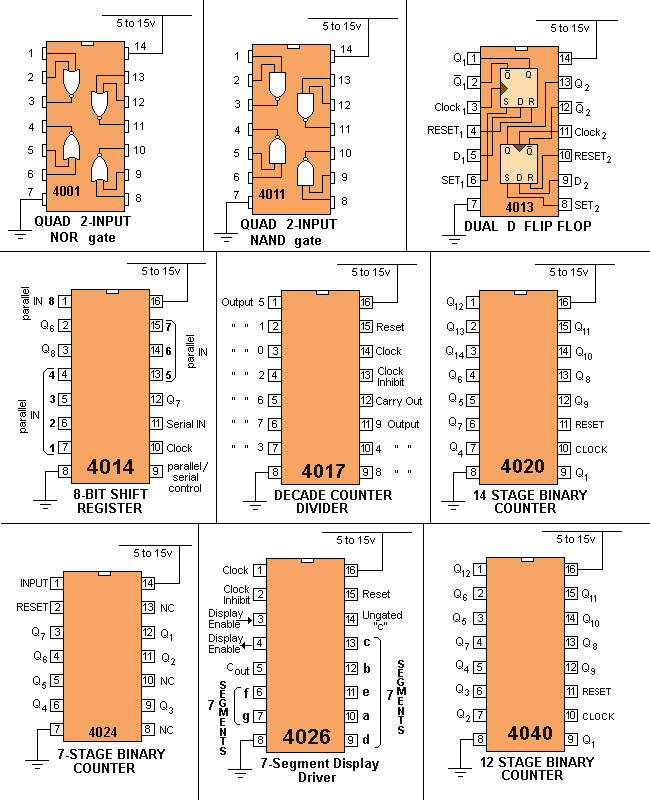
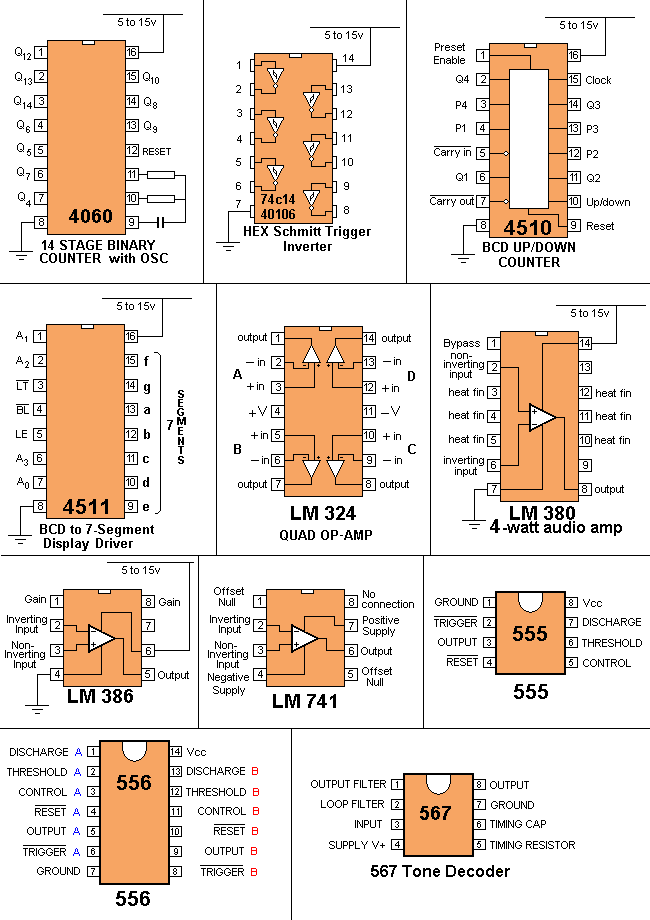
| INTRODUCTION This is the third part of our Circuits e-book series. It contains a further 100 circuits. This time we have concentrated on circuits containing one or more IC's. It's amazing what you can do with transistors but when Integrated Circuits came along, the whole field of electronics exploded. IC's can handle both analogue as well as digital signals but before their arrival, nearly all circuits were analogue or very simple "digital" switching circuits. Let's explain what we mean. The word analogue is a waveform or signal that is changing (increasing and decreasing) at a constant or non constant rate. Examples are voice, music, tones, sounds and frequencies. Equipment such as radios, TV's and amplifiers process analogue signals. Then digital came along. Digital is similar to a switch turning something on and off. The advantage of digital is two-fold. Firstly it is a very reliable and accurate way to send a signal. The signal is either HIGH or LOW (ON or OFF). It cannot be half-on or one quarter-off. And secondly, a circuit that is ON, consumes the least amount of energy in the controlling device. In other words, a transistor that is fully turned ON and driving a motor, dissipates the least amount of heat. If it is slightly turned ON or nearly fully turned ON, it gets very hot. And obviously a transistor that is not turned on at all will consume no energy. A transistor that turns ON fully and OFF fully is called a SWITCH. When two transistors are cross-coupled in the form of a flip flop, any pulses entering the circuit cause it to flip and flop and the output goes HIGH on every second pulse. This means the circuit halves the input pulses and is the basis of counting or dividing. It is also the basis of a "Memory Cell" as will will hold a piece of information. Digital circuits also introduce the concept of two inputs creating a HIGH output when both are HIGH and variations of this. This is called "logic" and introduces terms such as "Boolean algebra" (Boolean logic) and "gates." Integrated Circuits started with a few transistors in each "chip" and increased to mini or micro computers in a single chip. These chips are called Microcontrollers and a single chip with a few surrounding components can be programmed to play games, monitor heart-rate and do all sorts of amazing things. Because they can process information at high speed, the end result can appear to have intelligence and this is where we are heading: AI (Artificial Intelligence). In this IC Circuits ebook, we have presented about 100 interesting circuits using Integrated Circuits. In most cases the IC will contain 10 - 100 transistors, cost less than the individual components and take up much less board-space. They also save a lot of circuit designing and quite often consume less current than discrete components or the components they replace. In all, they are a fantastic way to get something working with the least componentry. A list of of some of the most common Integrated Circuits (Chips) is provided at the end of this book to help you identify the pins and show you what is inside the chip. Some of the circuits are available from Talking Electronics as a kit, but others will have to be purchased as individual components from your local electronics store. Electronics is such an enormous field that we cannot provide kits for everything. But if you have a query about one of the circuits, you can contact me. Colin Mitchell TALKING ELECTRONICS. talking@tpg.com.au To save space we have not provided lengthy explanations of how the circuits work. This has already been covered in TALKING ELECTRONICS Basic Electronics Course, and can be obtained on a CD for $10.00 (posted to anywhere in the world) See Talking Electronics website for more details: http://www.talkingelectronics.com
MORE INTRO |
|
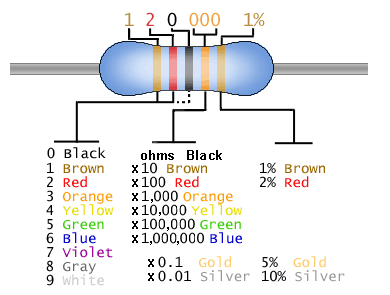
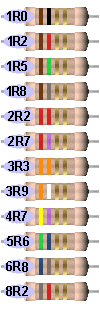
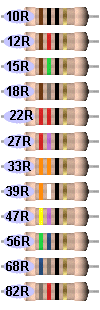
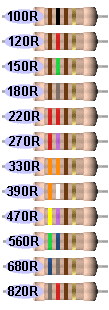
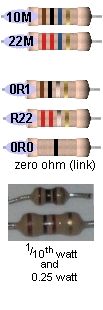
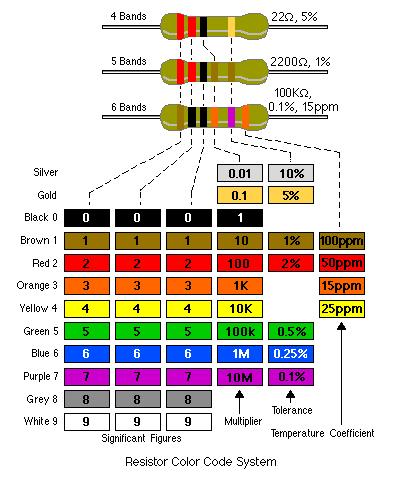
RESISTOR COLOUR CODE
|
|
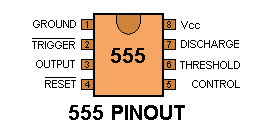
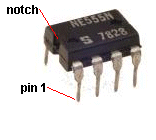
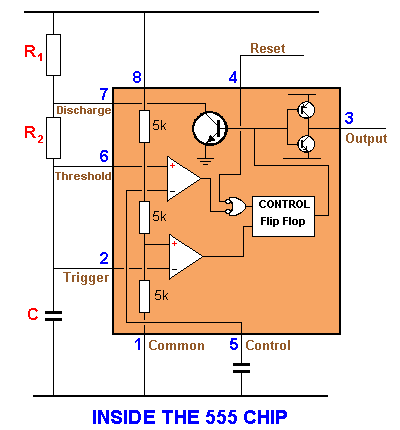
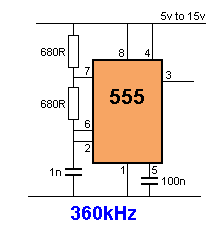
THE 555 The 555 is everywhere. It is possibly the most-frequency used chip and is easy to use. But if you want to use it in a "one-shot" or similar circuit, you need to know how the chip will "sit." For this you need to know about the UPPER THRESHOLD (pin 6) and LOWER THRESHOLD (pin 2): The 555 is fully covered in a 3 page article on Talking Electronics website (see left index: 555 P1 P2 P3) Here is the pin identification for each pin: ![]() ![]() When drawing a circuit diagram, always draw the 555 as a building block with the pins in the following locations. This will help you instantly recognise the function of each pin:
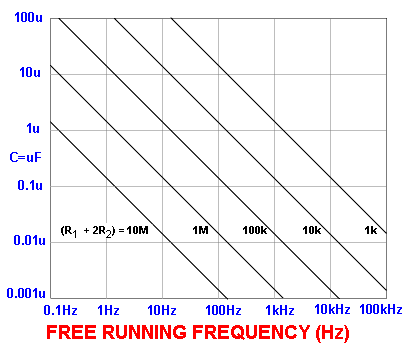
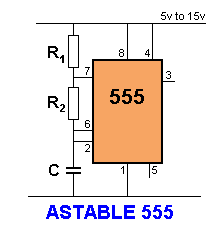
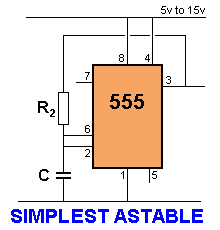
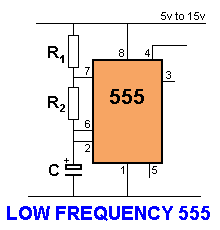
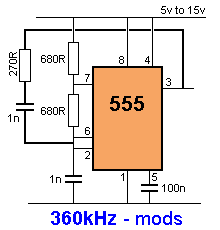
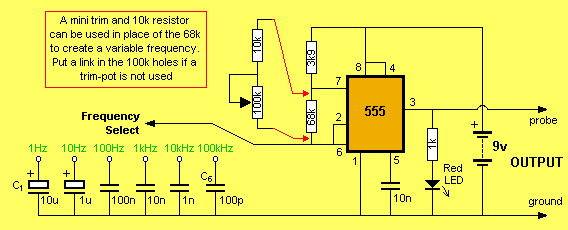
![]() Note: Pin 7 is "in phase" with output Pin 3 (both are low at the same time). Pin 7 "shorts" to 0v via the transistor. It is pulled HIGH via R1. Maximum supply voltage 16v - 18v Current consumption approx 10mA Output Current sink @5v = 5 - 50mA @15v = 50mA Output Current source @5v = 100mA @15v = 200mA Maximum operating frequency 300kHz - 500kHz Faults with Chip: Consumes about 10mA when sitting in circuit Output voltage up to 2.5v less than rail voltage Output is 0.5v to 1.5v above ground Sources up to 200mA but sinks only 50mA HOW TO USE THE 555 There are many ways to use the 55. (a) Astable Multivibrator - constantly oscillates (b) Monostable - changes state only once per trigger pulse - also called a ONE SHOT (c) Voltage Controlled Oscillator ASTABLE MULTIVIBRATOR The output frequency of a 555 can be worked out from the following graph: ![]() The graph applies to the following Astable circuit:
Suppose R1 = 1k, R2 = 10k and C = 0.1 (100n). Using the formula on the graph, the total resistance = 1 + 10 + 10 = 21k The scales on the graph are logarithmic so that 21k is approximately near the "1" on the 10k. Draw a line parallel to the lines on the graph and where it crosses the 0.1u line, is the answer. The result is approx 900Hz. Suppose R1 = 10k, R2 = 100k and C = 1u Using the formula on the graph, the total resistance = 10 + 100 + 100 = 210k The scales on the graph are logarithmic so that 210k is approximately near the first "0" on the 100k. Draw a line parallel to the lines on the graph and where it crosses the 1u line, is the answer. The result is approx 9Hz. The frequency of an astable circuit can also be worked out from the following formula:
555 ASTABLE
OSCILLATORS
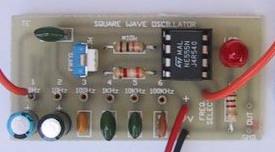
SQUARE WAVE OSCILLATOR
|
|||||||||||||||||||||||||||||||||||||||||||||||||||||||||||||
50 - 555 CIRCUITS![]() 50 555 Circuits eBook can be accessed on the web or downloaded as a .doc or .pdf It has more than 50 very interesting 555 circuits and data on using a 555. Table of Contents: (more has been added - see: 50 - 555 circuits)
|
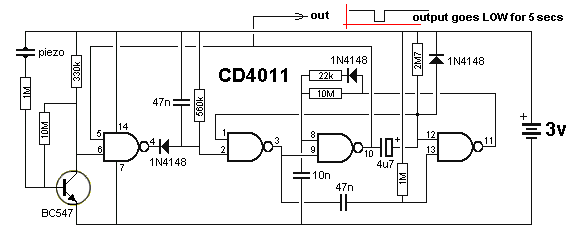
![]() KNOCK KNOCK DOORBELL This very clever circuit only produces an output when the piezo detects two taps. It can be used as a knock-knock doorbell. A PC board containing all components (soldered to the board) is available from talking electronics for $5.00 plus postage. Email HERE for details. The circuit takes only a few microamp and when a tap is detected by the piezo, the waveform from the transistor produces a HIGH on pin 6 and the HIGH on pin 5 makes output pin 4 go low. This very quickly charges the 47n and it is discharged via the 560k to produce a brief pulse at pin 3. The 47n is mainly to stop noise entering pin 2. Pin 1 is HIGH via the 2M7 and the LOW on pin 2 causes pin 3 to produce a HIGH pulse. The 47n is discharged via the internal diodes on pin 13 and when it goes LOW, pin 11 goes HIGH and charges the 10n via the 22k and diode. This puts a HIGH on pin 8 for approx 0.7 seconds and when a second tap is detected, pin 9 sees a HIGH and pin 10 goes LOW. This puts a LOW on pin 12 and a HIGH on pin 8. The LOW on pin 12 goes to pin 1. A HIGH and LOW on the second NAND gate produces a HIGH on pin 3 and the third NAND gate has a HIGH on both inputs. This makes pin 10 LOW and the 4u7 starts to charge via the 2M7 resistor. After 5 seconds pin 12 sees a HIGH and pin 11 goes LOW. The 10n is discharged via the 10M and when pin 8 sees a LOW, pin 10 goes HIGH. The output sits HIGH and goes LOW for about 7 seconds. |
|
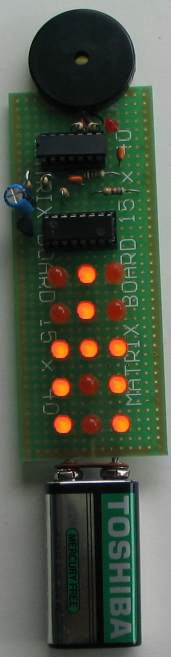
LED ZEPPELIN
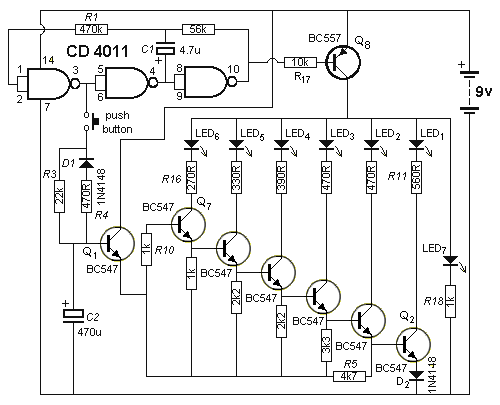
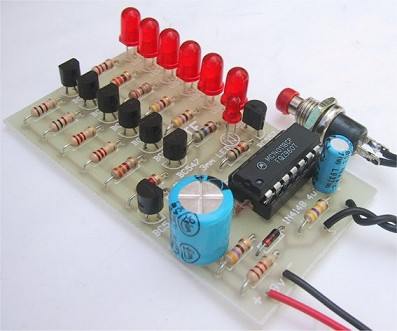
This circuit is a game of skill. See full article: LED Zeppelin. The kit is available from talking electronics for $15.50 plus postage. Email HERE for details. The game consists of six LEDs and an indicator LED that flashes at a rate of about 2 cycles per second. A push button is the "Operations Control" and by carefully pushing the button in synchronisation with the flashing LED, the row of LEDs will gradually light up. But the slightest mistake will immediately extinguish one, two or three LEDs. The aim of the game is to illuminate the 6 LEDs with the least number of pushes. We have sold thousands of these kits. It's a great challenge.
![]() |
|
BFO METAL DETECTOR
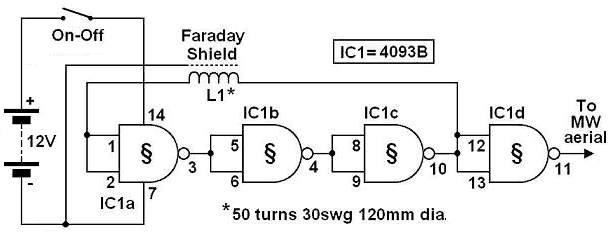
The circuit shown must represent the limits of simplicity for a metal detector. It uses a single 4093 quad Schmitt NAND IC and a search coil -- and of course a switch and batteries. A lead from IC1d pin 11 needs to be attached to a MW radio aerial, or should be wrapped around the radio. If the radio has a BFO switch, switch this ON. Since an inductor resists rapid changes in voltage (called reactance), any change in the logic level at IC1c pin 10 is delayed during transfer back to input pins 1 and 2. This is further delayed through propagation delays within the 4093 IC. This sets up a rapid oscillation (about 2 MHz), which is picked up by a MW radio. Any change to the inductance of L1 (through the presence of metal) brings about a change to the oscillator frequency. Although 2 MHz is out of range of the Medium Waves, a MW radio will clearly pick up harmonics of this frequency. The winding of the coil is by no means critical, and a great deal of latitude is permissible. The prototype used 50 turns of 22 awg/30 swg (0.315 mm) enamelled copper wire, wound on a 4.7"/120 mm former. This was then wrapped in insulation tape. The coil then requires a Faraday shield, which is connected to 0V. A Faraday shield is a wrapping of tin foil around the coil, leaving a small gap so that the foil does not complete the entire circumference of the coil. The Faraday shield is again wrapped in insulation tape. A connection may be made to the Faraday shield by wrapping a bare piece of stiff wire around it before adding the tape. Ideally, the search coil will be wired to the circuit by means of twin-core or figure-8 microphone cable, with the screen being wired to the Faraday shield. The metal detector is set up by tuning the MW radio to pick up a whistle (a harmonic of 2 MHz). Note that not every such harmonic works best, and the most suitable one needs to be found. The presence of metal will then clearly change the tone of the whistle. The metal detector has excellent stability, and it should detect a large coin at 80 to 90 mm, which for a BFO detector is relatively good. It will also discriminate between ferrous and non-ferrous metals through a rise or fall in tone. Copyright Rev. Thomas Scarborough The author may be contacted at scarboro@iafrica.com
|
|
SIMPLE BFO METAL LOCATOR This circuit uses a single coil and nine components to make a particularly sensitive low-cost metal locator. It works on the principle of a beat frequency oscillator (BFO). The circuit incorporates two oscillators, both operating at about 40kHz. The first, IC1a, is a standard CMOS oscillator with its frequency adjustable via VR1. The frequency of the second, IC1b, is highly dependent on the inductance of coil L1, so that its frequency shifts in the presence of metal. L1 is 70 turns of 0.315mm enamelled copper wire wound on a 120mm diameter former. The Faraday shield is made of aluminum foil, which is wound around all but about 10mm of the coil and connected to pin 4 of IC1b. The two oscillator signals are mixed through IC1c, to create a beat note. IC1d and IC1c drive the piezo sounder in push-pull fashion, thereby boosting the output. Unlike many other metal locators of its kind, this locator is particularly easy to tune. Around the midpoint setting of VR1, there will be a loud beat frequency with a null point in the middle. The locator needs to be tuned to a low frequency beat note to one or the other side of this null point. Depending on which side is chosen, it will be sensitive to either ferrous or non-ferrous metals. Besides detecting objects under the ground, the circuit could serve well as a pipe locator.
|
|
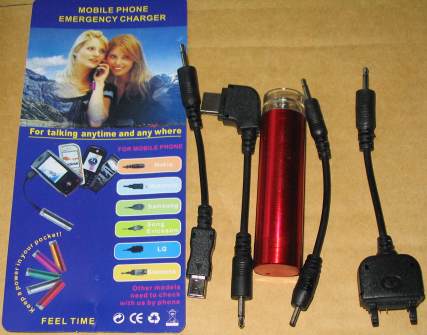
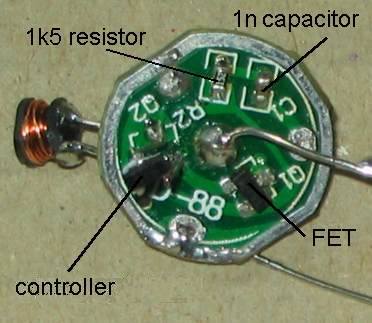
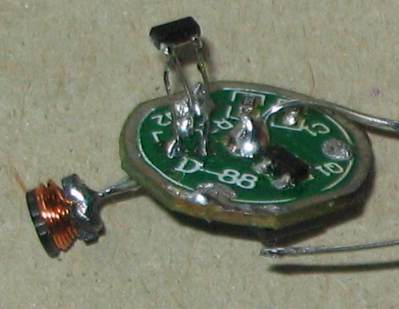
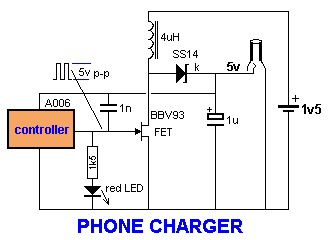
1.5v to 5v PHONE CHARGER Look at the photos. The circuit is simple. It looks like two surface-mount transistors, an inductor, diode, capacitor, resistor and LED. But you will be mistaken. One of the "transistors" is a controller and the other is a FET. The controller is powered from the output (5v) of the circuit and when it detects no-load, it shuts down and requires a very small current. When the 1v5 batter is connected, the controller starts up at less than 1v5 due to the Schottkey diode and charges the 1u capacitor by driving the FET and using the flyback effect of the inductor to produce a high voltage. When the output voltage is 5v, the controller turns off and the only load on the 1u is the controller. When the voltage drops across this capacitor, the controller turns on in bursts to keep the 1u charged to exactly 5v. The charger was purchased for $3.00 so it is cheaper to buy one and use it in your own project. It also comes with 4 adapter leads!
|
|
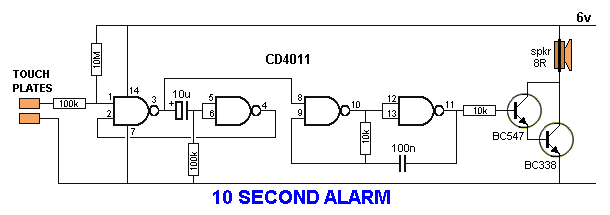
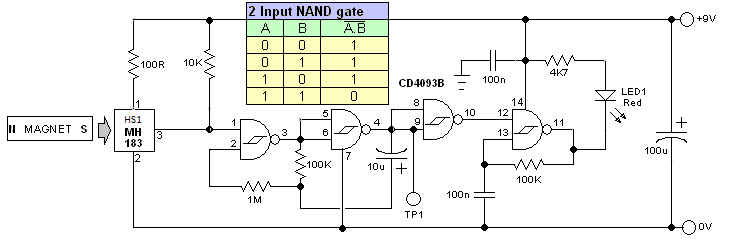
10 SECOND ALARM This circuit is activated for 10 seconds via the first two gates. They form a LATCH to keep the oscillator (made up of the next two gates) in operation, to drive the speaker. The circuit consumes a few microamps in quiescent mode and the TOUCH PLATES can be any type of foil on a door knob or item that is required to be protected. The 10u sits in an uncharged condition and when the plates are touched, the voltage on pin 1 drops below 50% rail and makes pin 3 HIGH. This pulls pins 5 and 6 HIGH and makes pin 4 LOW. This keeps pin 3 HIGH, no matter if a HIGH or LOW is on pin1. This turns on the oscillator and the 10u starts to charge via the 100k resistor. After about 10 seconds, the voltage on pins 5 and 6 drops to below 50% rail voltage and pin 4 goes HIGH. If the TOUCH PLATES are not touched, pin 3 will go LOW and the oscillator will stop. ![]() |
|
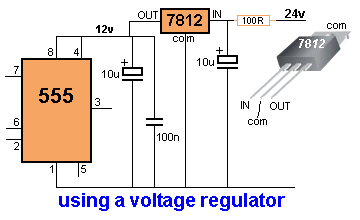
USING A VOLTAGE REGULATOR This circuit shows how to use a voltage regulator to convert a 24v supply to 12v for a 555 chip. Note: the pins on the regulator (commonly called a 3-terminal regulator) are: IN, COMMON, OUT and these must match-up with: In, Common, Out on the circuit diagram. If the current requirement is less than 500mA, a 100R "safety resistor" can be placed on the 24v rail to prevent spikes damaging the regulator. ![]() |
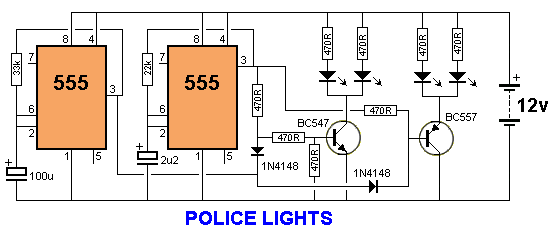
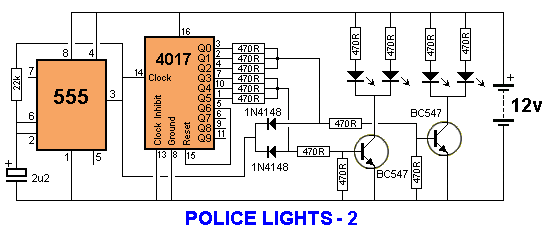
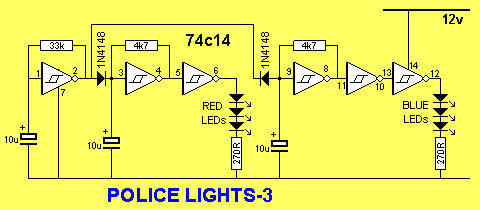
| POLICE LIGHTS These three circuits flash the left LEDs 3 times then the right LEDs 3 times, then repeats. The only difference is the choice of chips. ![]() ![]()
|
|
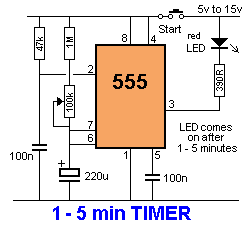
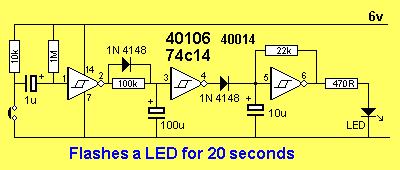
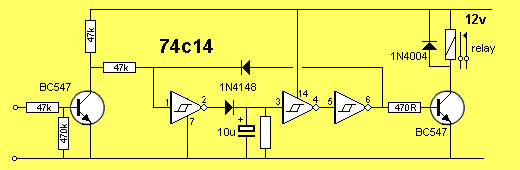
FLASH LEDS FOR 20 SECONDS This circuit comes from a request from a reader. It flashes a LED for 20 seconds after a switch is pressed. In other words, for 20 seconds as soon as the switch is pressed. The values will need to be adjusted to get the required flash-rate and timing. ![]() |
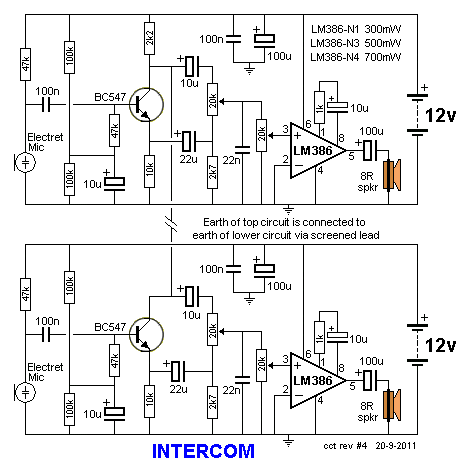
INTERCOM![]()
This circuit uses a single
transistor and LM386 amplifier IC to produce an intercom that
allows hands-free operation.
As both microphones and loudspeakers are always connected, the circuit is designed to avoid feedback - known as the "Larsen effect". The microphone amplifier transistor is 180° phase-shifted and one of the audio outputs is taken at the collector and its in-phase output taken at the emitter. These are mixed by the 10u, 22u, 20k pot and 2k7 so that the two signals almost cancel out. In this way, the loudspeaker will reproduce a very faint copy of the signals picked-up by the microphone. At the same time, as both collectors of the two intercom units are tied together, the 180° phase-shifted signal will pass to the audio amplifier of the second unit without attenuation, so it will be loudly reproduced by its loudspeaker. The same operation will occur when speaking into the microphone of the second unit. When the 20k pot is set correctly, almost no output will be heard from the loudspeaker but a loud and clear reproduction will be heard at the output of the other unit. The second 20k pot adjusts the volume. |
|
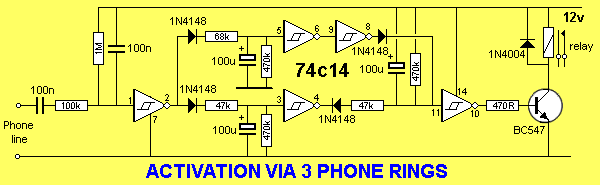
ACTIVATE VIA 3 PHONE RINGS
This circuit
connects to a phone line. When the phone rings for 3 or 4 rings, the
relay is activated for about 1 minute. But if the phone
rings for 6 or more rings, the circuit is not activated.
The circuit takes less than 100uA when in quiescent state and when the phone rings, the ring voltage is passed to pin 1 via the 100k and 100n capacitor. This causes pin 2 to go HIGH and charge two 100u electrolytics. The lower 100u charges in 7 seconds and the upper charges in 12 seconds. If the phone rings for only 3 rings, pin 4 goes LOW and charges the third 100u via a 47k resistor. After a further 7 seconds, pin 10 goes HIGH. If the phone stops ringing after 3 rings, the lower 100u starts to discharge via the 470k and after about 40 seconds pin 4 goes HIGH. The third 100u now starts to discharge via the 470k across it and the relay turns off. If the phone rings for more than 5 rings, the top 100u will charge and pin 6 will go LOW and cause pin 8 to go HIGH and prevent pin 11 going LOW via the gating diode.
|
|
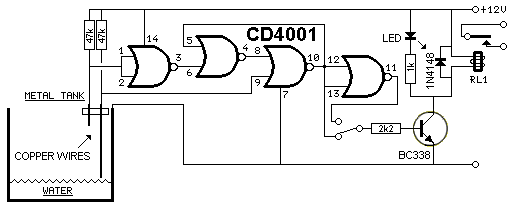
WATER LEVEL PUMP CONTROLLER
This circuit provides automatic level control of a water
tank.
The shorter steel rod is the "water high" sensor and the longer is the "water low" sensor. When the water level is below both sensors, pin 10 is low. If the water comes in contact with the longer sensor the output remains low until the shorter sensor is reached. At this point pin11 goes high and the transistor conducts. The relay is energized and the pump starts operating. When the water level drops the shorter sensor will be no longer in contact with the water, but the output of the IC will keep the transistor tuned ON until the water falls below the level of the longer rod. When the water level falls below the longer sensor, the output of the IC goes low and the pump will stop. The switch provides reverse operation. Switching to connect the transistor to pin 11 of the IC will cause the pump will operate when the tank is nearly empty and will stop when the tank is full. In this case, the pump will be used to fill the tank and not to empty it. Note: The two steel rods must be supported by a small insulated (wooden or plastic) board. The circuit can be used also with non-metal tanks, provided a third steel rod having about the same height as the tank is connected to the negative. Adding an alarm to pin 11 will let you know the tank is nearly empty. ![]() |
|
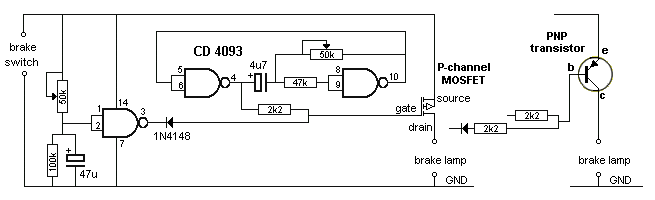
BRAKE LIGHTS
This circuit makes the brake lights
flash a number of times then stay ON. The circuit shows how a
MOSFET works. The MOSFET is turned on with a voltage between the
gate and source. This occurs in the circuit when the gate is
LOW. The P-channel MOSFET can be replaced by a PNP
transistor with the addition of a 2k2 between the diode and
base, to prevent the transistor being damaged when output pin 3
goes LOW. Ideally the PNP transistor should be replaced with a
Darlington transistor.
![]() |
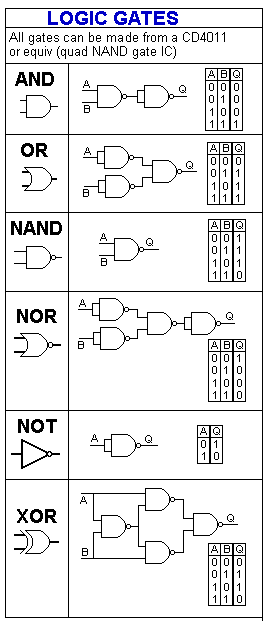
![]() LOGIC GATES It's very handy to remember that all the logic gates can be made from a Quad NAND gate such as CD4011. |
|
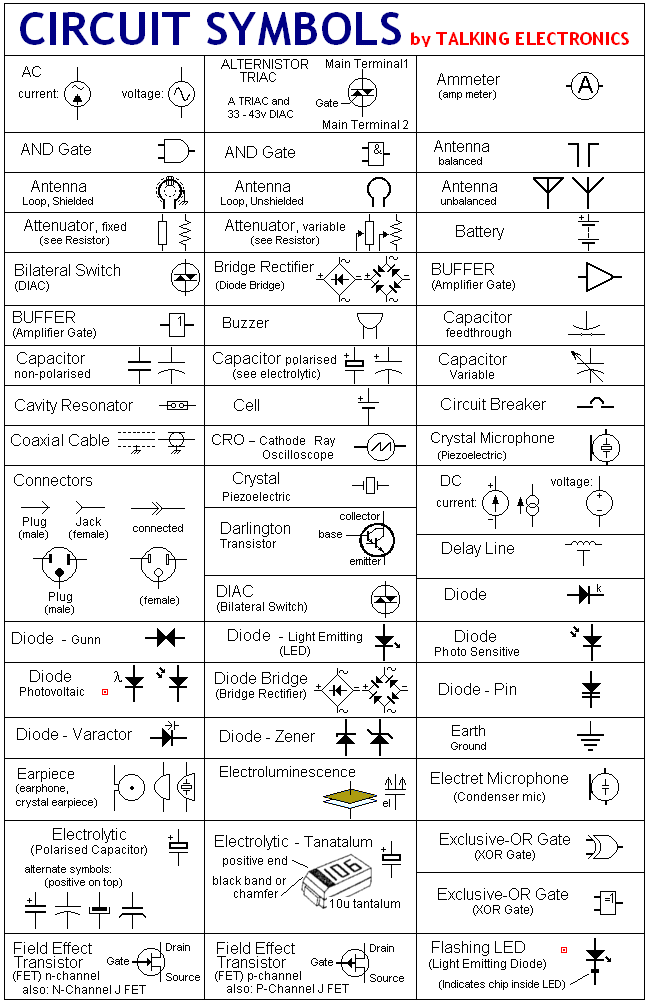
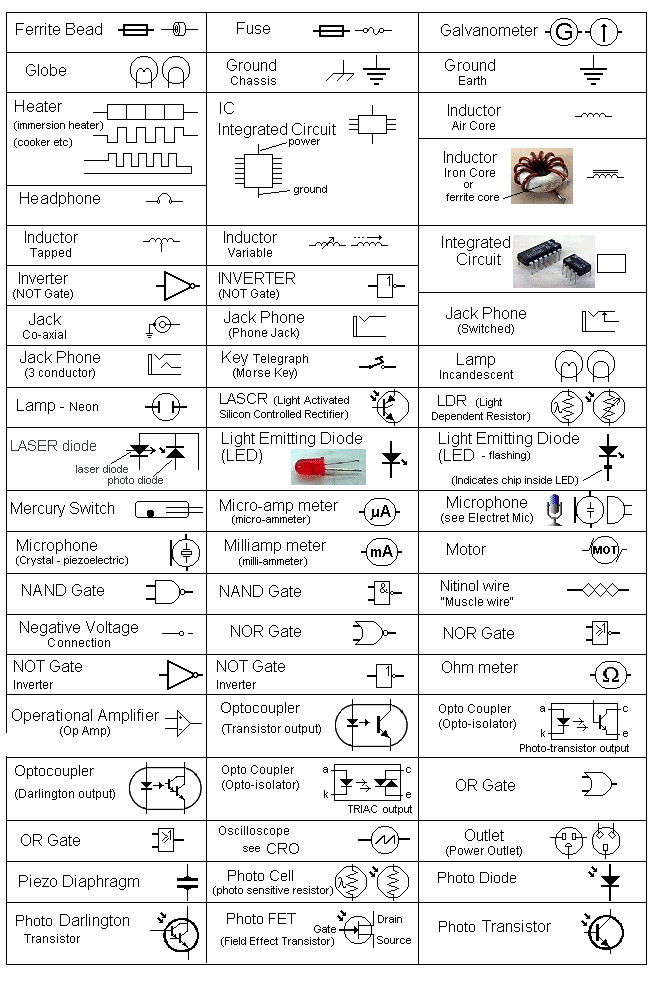
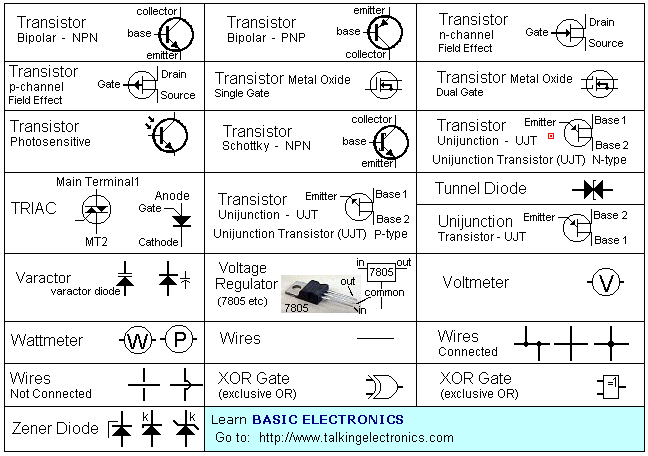
Circuit Symbols
CIRCUIT SYMBOLS
Some additional symbols
have been added to the following list. See Circuit Symbols on the
index of |


|
IC PINOUTS |


to Index
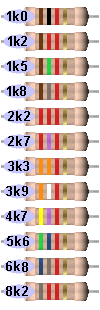
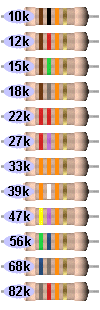
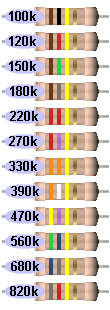
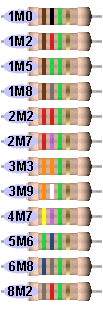
All the resistor colours:
This is called the "normal" or "3 colour-band" (5%)
range. If you want the 4 colour-band (1%) series, refer to
Talking Electronics website and click: Resistors 1% on the left index. Or
you can use the table below.
![]() |
![]() |
![]() |
![]() |
![]() |
![]() |
![]() |
![]() |
|
MAKE ANY RESISTOR VALUE:
There are other ways to combine 2
resistors in parallel or series to get a particular value. The
examples above are just one way. |
|
MAKE ANY CAPACITOR VALUE:
The value "10" in the chart above can be 10p, 10n or 10u. The chart works for all decades (values). |